


Many nonprofits pair the Little Green Light donor database with 4aGoodCause’s high-performing fundraising pages and use this integration to keep transaction data automatically in sync.
If your organization uses Little Green Light to manage donor records, enabling this integration can save time and reduce manual data entry.
Once connected, all transactions processed through 4aGoodCause sync to Little Green Light in real time, including:
One-time donations
Recurring donation payments
Event registrations
Transactions submitted online by supporters
Transactions manually entered by your nonprofit team
This keeps your fundraising activity and donor records current in Little Green Light, so your team can spend less time transferring data and more time connecting with supporters.
Use this guide to connect your account and understand what data is sent to Little Green Light. You can also map each 4aGoodCause campaign to a specific Campaign and Appeal in your Little Green Light account, so gifts land exactly where your team expects them.
How to Enable the Integration
To enable the Little Green Light integration, first obtain an API key from your Little Green Light account. Then, enter that API key in 4aGoodCause to connect the two systems and begin syncing transactions.
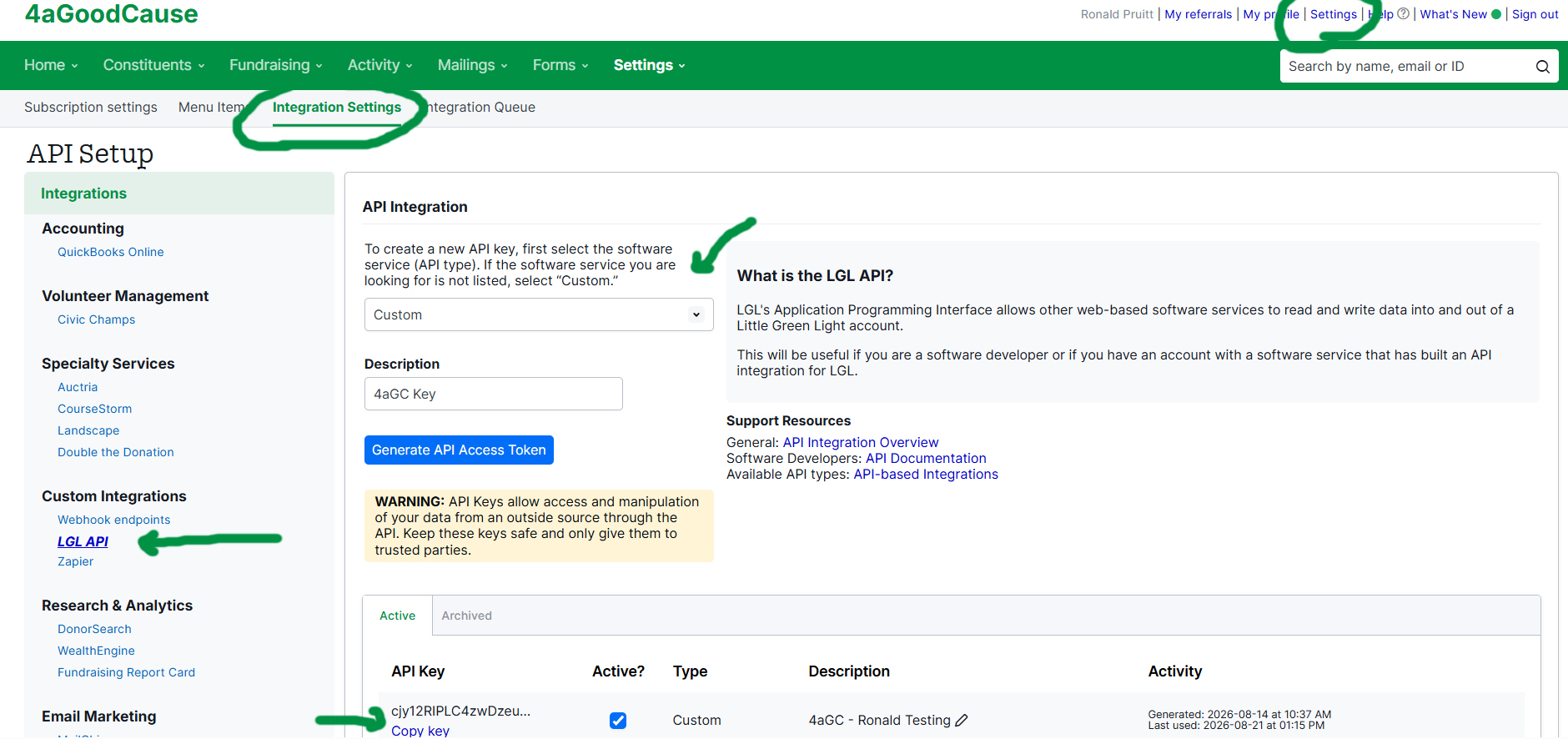
How to Get Your LGL API Key
Log in to your Little Green Light Account.
Go to the Settings menu and click on Integration Settings.
Click LGL API under Custom Integrations.
Choose Custom from the API drop-down list.
Name the API Key in the Description field. Something like "4aGoodCause Key" will work.
Click the button Generate API Access Token.
Your new key will appear in the list below.
Click Copy Key to put your key into your clipboard.
You'll now take that key to 4aGC to enter it and enable the integration.
How to Enable the Integration in 4aGC
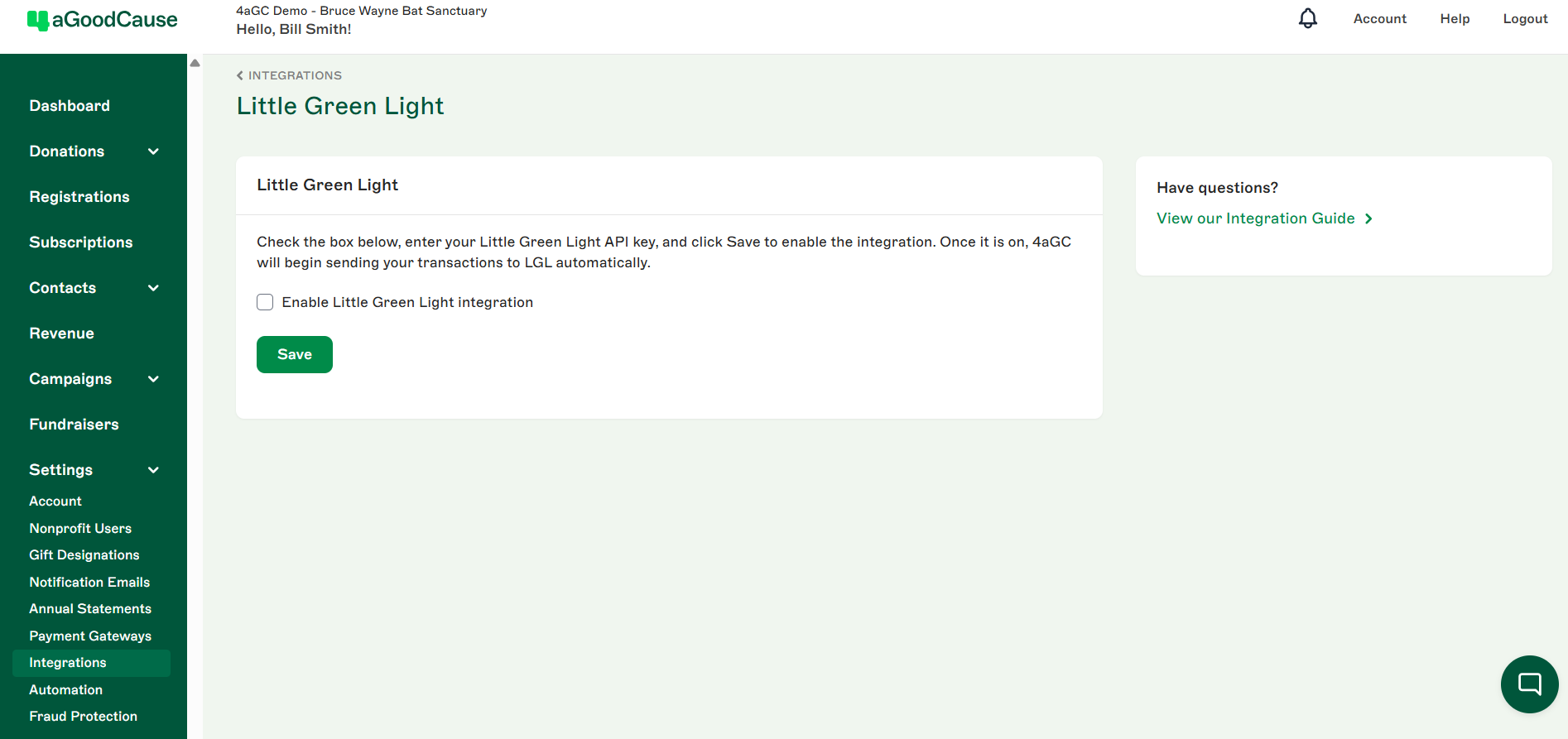
Log in to https://4agc.com as a Nonprofit User.
Click on Settings on the left menu.
Click on Integrations on the left menu.
Click the Little Green Light logo.
Check the box to Enable Little Green Light integration
Enter your API Key in the text box provided.
Click Save.
Once the integration is enabled, future transactions processed through 4aGoodCause will sync to Little Green Light in real time.
How to Map a Campaign to an LGL Campaign and Appeal
By default, 4aGoodCause sends the name of the 4aGC campaign to the Campaign field in Little Green Light and leaves the Appeal field blank. If your LGL account already has the Campaigns and Appeals you use for reporting, you can map a campaign to them instead.
LGL mapping is a campaign setting, not part of the integration settings above. You set it on each campaign individually, in the LGL Mapping section of the campaign’s Campaign Info tab. Each 4aGoodCause campaign can map to a different Campaign and Appeal in Little Green Light, so you’ll repeat these steps for every campaign you want to map.
The Little Green Light integration must be enabled before the LGL Mapping section appears on your campaigns.
How to Map a Campaign
Log in to https://4agc.com as a Nonprofit User.
Click Campaigns on the left menu.
You will see a list of your current campaigns.
Click the Menu icon on the right for the campaign you want to map.
Select Edit from the menu.
Choose the Campaign Info tab.
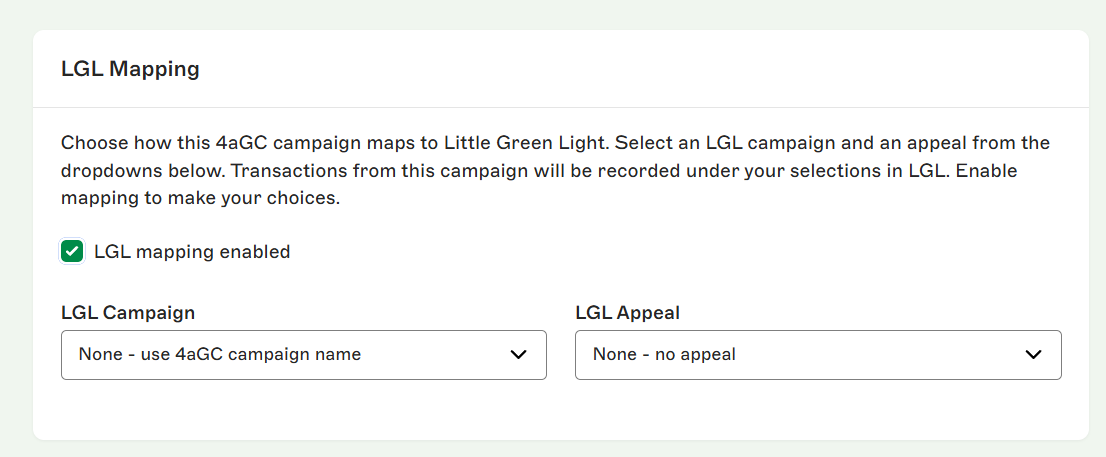
Scroll down to the LGL Mapping section.
Check the box - LGL mapping enabled.
Select the Campaign and/or Appeal from your Little Green Light account that this campaign should map to.
Click Update Campaign.
Mapping notes
Live from LGL: The Campaign and Appeal lists are pulled live from your Little Green Light account. If you add a new Campaign or Appeal in LGL, it will appear here automatically.
Each field falls back on its own: You can map one or both fields. If you don’t select a Campaign, 4aGoodCause sends the 4aGC campaign name. If you don’t select an Appeal, the Appeal field is left blank.
Applies to future transactions: The mapping applies to future transactions only. This includes upcoming payments on existing recurring donations, so if you change the mapping later, future recurring payments use the new mapping.
Covers every transaction type: Mapping applies to one-time donations, recurring donation payments, registrations, and peer credit gifts.
How Data Maps to Little Green Light
When a transaction syncs from 4aGoodCause, its donor, gift, registration, and payment details are mapped to the appropriate records and fields in Little Green Light. The sections below explain what information syncs and how it appears in LGL.
One-time Donations
When a donation is received in 4aGoodCause, whether it comes from a donation page, is entered manually, or is received through a webhook, 4aGoodCause prepares the transaction for syncing to Little Green Light.
In Little Green Light, donor records are called Constituents. Before creating a gift, 4aGoodCause looks for an existing Constituent record using the following matching order:
Email address
If no email match is found, a combination of:
First name
Last name
Address 1
If a Matching Constituent Is Found
The donation is associated with the existing Constituent record.
4aGoodCause adds available contact details without overwriting existing information in Little Green Light. For example, if the transaction includes a different phone number or address, the new information can be added to the Constituent record.
If No Matching Constituent Is Found
4aGoodCause creates a new Constituent record in Little Green Light using the following information:
Constituent Field Mapping
Little Green Light Field | 4aGoodCause Data or Default Value |
|---|---|
Contact Type | Primary |
First Name | [First Name] |
Last Name | [Last Name] |
Street | [Address 1] + [Address 2] |
City | [City] |
State/Province | [State/Province] |
Zip/Postal Code | [Zip/Postal Code] |
Country | [Country] |
Phone | [Phone] |
Once 4aGoodCause has the Constituent ID, it creates the donation record in Little Green Light.
In Little Green Light, donations are called Gifts. After 4aGoodCause finds or creates the matching Constituent record, it creates a new Gift record and links it to that Constituent.
Some Little Green Light fields use dropdown values. The values shown in quotation marks below, such as Gift or Donation, are dropdown options in Little Green Light. If a required option does not already exist in your account, 4aGoodCause will create it automatically during the sync.
One-time Donation Gift Field Mapping
Little Green Light Field | 4aGoodCause Data or Default Value |
|---|---|
Constituent ID | [LGL Constituent ID] |
Amount | [Total] |
Gift Type | "Gift" |
Category | "Donation" |
Gift Date | [Transaction Date] |
Notes/Description | [Transaction ID + Transaction Description] |
Deductible Amount | [Total minus non-tax-deductible amount] |
Payment Type | "4aGoodCause - " + [Payment Method] |
Campaign | [Mapped LGL Campaign], or [Campaign] if not mapped |
Appeal | [Mapped LGL Appeal], or blank if not mapped |
Fund | [Gift Designation] |
Tribute | Honorary - General or Memorial-General |
Honoree | [Tribute Name] |
Dedication | [Tribute Message] |
Deposited Amount | [Total] |
Recurring Donations
Recurring donation payments follow the same Constituent matching and Gift creation process described above, including any LGL Campaign and Appeal mapping. The only difference is the Category used on the Little Green Light Gift record.
Recurring Donation Gift Mapping
Little Green Light Field | 4aGoodCause Data or Default Value |
|---|---|
Category | "Recurring donation" |
Peer-to-Peer Donation
A peer-to-peer donation is made through a fundraiser’s peer-to-peer page in 4aGoodCause.
The donor’s donation is synced to Little Green Light using the same Constituent matching and Gift creation process described above. In addition, 4aGoodCause records the fundraiser who referred the donor to your organization.
4aGoodCause creates or matches a Constituent record for the peer-to-peer fundraiser, then creates a related Gift record to give that person credit for the donation. This related record is called a Peer Credit.
Peer Credit Gift Mapping
Little Green Light Field | 4aGoodCause Data or Default Value |
|---|---|
Related Gift Type | "Peer Credit" |
Constituent ID | [LGL Constituent ID for the peer-to-peer fundraiser] |
Amount | [Total] |
Notes | [Transaction ID + Transaction Description] |
Campaign | [Mapped LGL Campaign], or [Campaign] if not mapped |
Appeal | [Mapped LGL Appeal], or blank if not mapped |
Registrations
Registrations follow the same Constituent matching and Gift creation process as one-time donations. 4aGoodCause finds or creates the registrant’s Constituent record, then creates a Gift record in Little Green Light.
The difference is the information sent to the Gift record.
Registration Mapping
Little Green Light Field | 4aGoodCause Data or Default Value |
|---|---|
Constituent ID | [LGL Constituent ID] |
Amount | [Total] |
Gift Type | "Other Income" |
Category | "Registration" |
Gift Date | [Transaction Date] |
Notes/Description | [Transaction ID + Transaction Description + Order Summary] |
Deductible Amount | $0 (Cannot apply custom amount on Other Income transactions) |
Payment Type | "4aGoodCause - " + [Payment Method] |
Campaign | [Mapped LGL Campaign], or [Campaign] if not mapped |
Appeal | [Mapped LGL Appeal], or blank if not mapped |
Deposited Amount | [Total] |
Tracking Little Green Light Record IDs in 4aGoodCause
For organizations with the Little Green Light integration enabled, 4aGoodCause stores the Little Green Light record IDs created through the sync.
Donation and Registration Records
Each donation and registration record includes an LGL Gift ID field.
Displayed as the last data point in the donation or registration record detail view
Included as a column in CSV and Excel exports
Contact Records
Each contact record includes an LGL Constituent ID field.
Displayed under More Info in the contact detail view
Included as a column in CSV and Excel exports
These fields are visible only to organizations using the Little Green Light integration.
Need Help?
If you have questions about the Little Green Light integration or need help setting it up, contact our support team at support@4agoodcause.com.